Whiteboard VASE Plug-in Interface
Authors:
David Y. Zhao - www.ministars.com
Lars Winkler Pettersson - www.handwritten.net
Magnus Andersson
© Copyright Stefan Seipel
Introduction
The vpiWhiteboard lets several avatars in a 3D environment interact with a shared whiteboard.
The vpiWhiteboard is a plugin designed for the Visual and Simulated Environment (VASE) and the Virtual Reality Toolkit (VRT).
The vpiWhiteboard uses the concept of vector graphics to store each drawn pen stroke as one object. Each pen stroke consists of a set of node points connected by straight lines. A document metaphor with pages is implemented so the vpiWhiteboard can be cleared without loosing its content. The vpiWhiteboard documents can be saved and restored from disk using a proprietary ASCII file format described at http://www.tugg.com/vw/vw_docs.pdf .
Using the whiteboard
Interaction with the whiteboard is carried out through mouse, digitizer tablet and keyboard input. The output is through visualization in the VASE/VRT 3D environment. The interface of both the whiteboard and the virtual room environment can be designed by changing a configuration file.
Commands in the user interface
Mouse commands are carried out using the vpiController plugins above and below the whiteboards drawing area. The top controller sets one of the five colors, white, green, blue, red or yellow as the current drawing color.

The bottom controller defines the following functions:
|
|
Insert one page before current page
|
|
|
Add one page before current page
|
|
|
Delete the current page |
|
|
Clear the current page |
|
|
Move to previous page |
|
|
Move to next page |
|
|
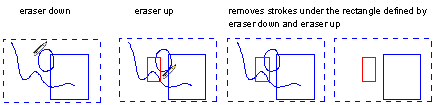
Set eraser as active tool – The eraser removes all strokes within the rectangular area defined by the corners of a pen down and pen up on the whiteboard. |
|
|
Set pen as active tool |


Mouse and digitizer tablet interaction
The command buttons on the bottom bar can only be accessed with the mouse. The digitizer tablet only supports active usage of the tool on the drawing area of the whiteboard, therefore can the digitizer tablet only be used to draw or erase pen strokes.
Note that the eraser removes all strokes within the area defined by the corners of an eraser-down event and eraser-up event on the whiteboard surface:
Keyboard interaction
|
F2 |
Opens the wtboard window. |
|
F3 |
Adds a page to the whiteboard document |
|
F4 |
Dialog window: open a whiteboard file stored in a proprietary ascii format. |
|
F5 |
Dialog window: saves a whiteboard file stored in a proprietary ascii format. |
|
F7 |
Move to previous page |
|
F8 |
Move to next page |
|
|
|
|
Ctrl - leftmouse button |
Move the avatar into full screen viewing position. This is carried out by sending a message to the vpiAvatar plugin. |
The configuration file
The VASE configuration file describes how plugins (.dll files) are positioned in the 3D environment and how they interact with other plugins
The vpiWhiteboard plugin is initiated in VASE using the component tag of the <configfile>.vas configuration file. Page interaction is handled through messages from the vpiController plugin defined below.
Example code for initiating the plugin in VASE
Comments (<!-- ) in green:
<component type="vpiwhiteboard" name="wtboard">
<!-- translates(moves) the whiteboard in x y and z directions -->
<translate>1.85 .75 -2.5</translate>
<!-- rotates the avatar 45 degrees around the y -->
<rotate>0 -45 0</rotate>
<!-- sets the width of the board to 1.5 units in VASE -->
<width>1.5</width>
<!-- sets the height of the board to 1.0 units in VASE -->
<height>1.0</height>
<!-- sets the RGB background colors of the whiteboard -->
<bgcolor_r>0</bgcolor_r>
<bgcolor_g>0</bgcolor_g>
<bgcolor_b>0</bgcolor_b>
<!-- show the pointer if value is 0 and hide if it is -1 -->
<show_pointer>0</show_pointer>
<!-- 1 if a WinTab/Wacom digitizer should be directly mapped to the whiteboard and 0 if it should be used as mouse -->
<activate_wintab>0</activate_wintab>
</component>
Example code for defining the vpiController plugin - edit
<component type="vpicontroller" name="edit">
<size>.3</size>
<scale>.5 .4 1.3</scale>
<rotate>0 -45 0</rotate>
<translate>1.75 0.1 -2.5</translate>
<!-- Each button sends a message <message> to the instance of vpiWhiteboard, named wtboard. vpiWhiteboard handle the messages stated below -->
<!-- sends a message inspage to the instance of vpiWhiteboard -->
<button>wtboard:inspage
<texture>textures\ins_icon.bmp</texture>
<type>pushbutton</type>
</button>
<!-- etc -->
<button>wtboard:addpage
<texture>textures\add_icon.bmp</texture>
<type>pushbutton</type>
</button>
<button>wtboard:delpage
<texture>textures\del_icon.bmp</texture>
<type>pushbutton</type>
</button>
<button>wtboard:clearpage
<texture>textures\clear_icon.bmp</texture>
<type>pushbutton</type>
</button>
<button>wtboard:previous
<texture>textures\prev_icon.bmp</texture>
<type>pushbutton</type>
</button>
<button>wtboard:next
<texture>textures\next_icon.bmp</texture>
<type>pushbutton</type>
</button>
<button>wtboard:seteraser
<texture>textures\eraser_icon.bmp</texture>
<type>radiobutton</type>
</button>
<button>wtboard:setpen
<texture>textures\pen_icon.bmp</texture>
<type>radiobutton</type>
</button>
</component>
Example code for defining the vpiController plugin - color
<component type="vpicontroller" name="color">
<size>.25</size>
<scale>.5 .4 1.3</scale>
<rotate>0 -45 0</rotate>
<translate>1.75 1.3 -2.5</translate>
<!-- Each button sends a message <message> to the instance of vpiWhiteboard, named wtboard. vpiWhiteboard handle the messages stated below -->
<!-- sends a message white to the instance of vpiWhiteboard.
Since the colors are hard coded this leaves for improvement.
-->
<button>wtboard:white
<texture>textures\white_icon.bmp</texture>
<type>radiobutton</type>
</button>
<button>wtboard:green
<texture>textures\green_icon.bmp</texture>
<type>radiobutton</type>
</button>
<button>wtboard:blue
<texture>textures\blue_icon.bmp</texture>
<type>radiobutton</type>
</button>
<button>wtboard:red
<texture>textures\red_icon.bmp</texture>
<type>radiobutton</type>
</button>
<button>wtboard:yellow
<texture>textures\yellow_icon.bmp</texture>
<type>radiobutton</type>
</button>
</component>
The whiteboard communication protocol
The whiteboard communication protocol uses the streep shared repository system to distribute drawn pen strokes from each client to all other clients. Streep guarantees that all clients will share the same data, although at some delay. The processing data unit in the communication protocol carries one stroke at a time over the network.
Processing Data Unit in the stroke distribution protocol
The processing data unit (PDU) is sent using a shared state m_pShareStroke. This shared variable takes a header STROKE_MESSAGE_HEADER and a body which is an array of WTBOARDDATANODE’s. The header describes the general properties of the stroke such as to which page it belong, what stroke color and line width it has. The number of nodes in the body of the PDU is assigned to the last value of the header. The body is an array of WTBOARDDATANODE struct’s which are describe in the documentation of the source at: http://groupnote.sf.net/vpiwhiteboard/doc/html/index.html
PDU: Header
|
Content |
Type |
Usage |
|
Version number |
unsigned char chVersion; |
1 |
|
Page ID |
UINT nPageID; |
0 to UINT |
|
Stroke ID |
UINT nStrokeID; |
0 to UINT, ids are continuously increasing during a session. |
|
Stroke color |
COLORREF StrokeColor; |
R G B |
|
Line Width |
unsigned char LineWidth; |
0-255 (the width is relative to users definition - the feature is currently not used in) |
|
Length in bytes of the data segment |
UINT nNodeCount; |
0-65355 bytes |
PDU: Body (WTBOARDDATANODE* - list of nodes)
|
Content |
Type |
Usage |
|
X coordinate of a node |
unsigned short PosX; |
0-65355 |
|
X coordinate of a node |
unsigned short PosY; |
0-65355 |
|
Pressure |
unsigned char Pressure;
|
0-255 127 is standard pressure stored if no pressure data is recorded. |
|
Time stamp |
unsigned long TimeStamp; |
Measured in milliseconds from 1970 Jan 1, currently not used |